Part 2 of archiving in trying times. This post is about recording what I’m piecing together about the various discs.
The Mebibyte/Megabyte discrepancy
Like physical drives, if you’re on Windows, disc media suffers from the same issue where the storage capacity on the label doesn’t match what you actually see on your computer. This is the mebibyte vs megabyte discrepancy in action.
Mebibytes count in base 2, megabytes count in base 10. If you’re coming into this kind of thing blind, base is “the number of unique digits, including the digit zero, used to represent numbers”.
When a storage media manufacturer says that you’re getting 80 gigabytes of storage, Windows measures those 80gb in Gibibytes, meaning you get 76 GiB. This happens with disc media too.
The discs
There are several types of disc media. In order to be cost effective, you’ll need to know which one you want to use for whatever you’re looking to store.
CD
Old faithful. There isn’t much to talk about in terms of CDs as they’ve had over 40 years of standardization and usage. CDs are readable by newer drives and are generally backwards compatible; you’ll see them used in doctor’s offices to store x-rays and other images for patients and other medical institutions.
CDs and DVDs have similar longevity ranging between 15 and 100 years, but the Library of Congress has indicated that CDs are more likely to hit the upper end of longevity due to differences in how the storage mechanisms in CDs are implemented, the materials used in making a CD, and the maturity of hardware for reading & writing CDs.
However, CDs have a common capacity of about 700 MB, which makes it difficult to store anything bigger than a music album.
DVD
If you’re a millenial, you’ll remember the gradual takeover of DVDs as VHS tapes faded away. DVDs have been around for roughly 30 years, considered the next step up from CDs.
The market has accommodated DVDs exceptionally well, with DVD drives being incredibly cheap during the early 2010s. It’s not difficult to find a DVD burner at all these days.
DVDs lag slightly behind CDs in longevity, but not by much. Again, CDs and DVDs have estimated lifespans ranging between 15 and 100 years, depending on storage.
Sony places the minimum longevity of a DVD at 30 years instead of 15 and provides guidelines on how to get to that mythical 100 year lifespan: https://www.sony.com/electronics/support/articles/00009195
In terms of storage capacity, DVDs are a bit weird in comparison to CDs; while CDs had a few variations, they most commonly were sold in the aforementioned 700 MB denomination.
DVDs, however, can range anywhere between 4.7 GB and 17 GB. The most common variations available on the market are DVD-5, providing 4.7 GB, and DVD-9, providing 8.5 GB.
DVD-9s are equipped with dual-layer recording. The technical jargon doesn’t really matter to us too much but it means that they typically have slower write speeds vs DVD-5s and CDs.
Bluray
Blurays are the new kid on the block, having only been around for about 20 years. If you’ve played a console game since 2007, you’ve been using Bluray discs.
No one’s done any strong studies on Bluray disc lifespan. What I’ve found is that people tend to assume that your average Bluray will have the same lifespan as a CD or DVD where it’ll probably last for 30+ years if you take care of it decently.
When used as archival tools, Bluray discs typically come in 25 GB, 50 GB, and 100 GB variants.
One spinoff product to take note of is the M-DISC, a variant of Bluray that its developer claims has a lifespan of 1000 years; a millennium, hence M-DISC. I don’t really recommend M-DISC for our needs as gamers and people with “basic” media.
Magnetic Tape

Magtape is almost entirely unviable for consumer purposes. It’s meant for corporate entities, cloud system providers (Microsoft Azure, Amazon Web Services, Google Cloud Platform), and data hoarders with a lot of space and money.
Most people do not have the room for a server rack in their house, let alone an apartment.
Take a look at HP’s Tape Autoloader blade:
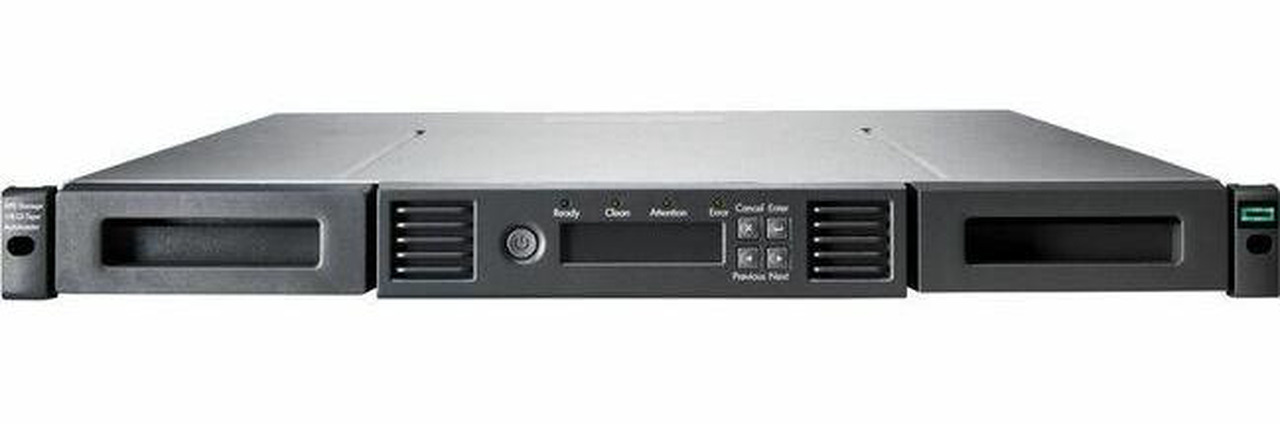
For the price of this blade alone you might as well spend it on a Synology NAS and RAID 0 some Western Digital Reds.
If you need further convincing, here are some Reddit threads on the subject:
General usage recommendations
Each of the three consumer-friendly types has its own usage. I’ve found that it’s pretty cost efficient to go all in on DVD-5s and DVD-9s because once you start offloading onto DVDs, you’ll know what’s going to need to go on a Bluray.
In general:
It’s smart to use CDs for documents, music, and very retro games (i.e., one CD for NES and SNES, any indie or old game with a 600mb-ish footprint).
DVDs are almost exclusively reserved for:
- games
- certain visual media still stuck between 480p and 720p (maybe 1080p)
- any stray programs you’d want to keep around
- some hobbyist pro-level photography
I’ve found that for “hobby-pro” photography, my albums/sessions don’t tend to exceed 7.5 GB, but I don’t think it’s a consistent storage method for those kinds of photos.
Bluray usage is pretty explicitly divided between games and video.
Risk
As with anything, there’s still risk to account for.
There’s a general risk for all disc media: deprecation & lack of hardware. You only need to look at the loss of VHS, Betamax, and HD-DVD.
There seems to be an ongoing market shift where manufacturers are ceasing production of consumer-grade Bluray burners. The one I purchased was made by a Taiwanese company and was a USB-powered external drive. Verbatim makes a $270 external Bluray drive if you want a company that sounds a bit more reputable.
External burners in general tend to have lower lifespans, and one of the long-term parts of this experiment is seeing how I’ll read and write the Blurays I do make.