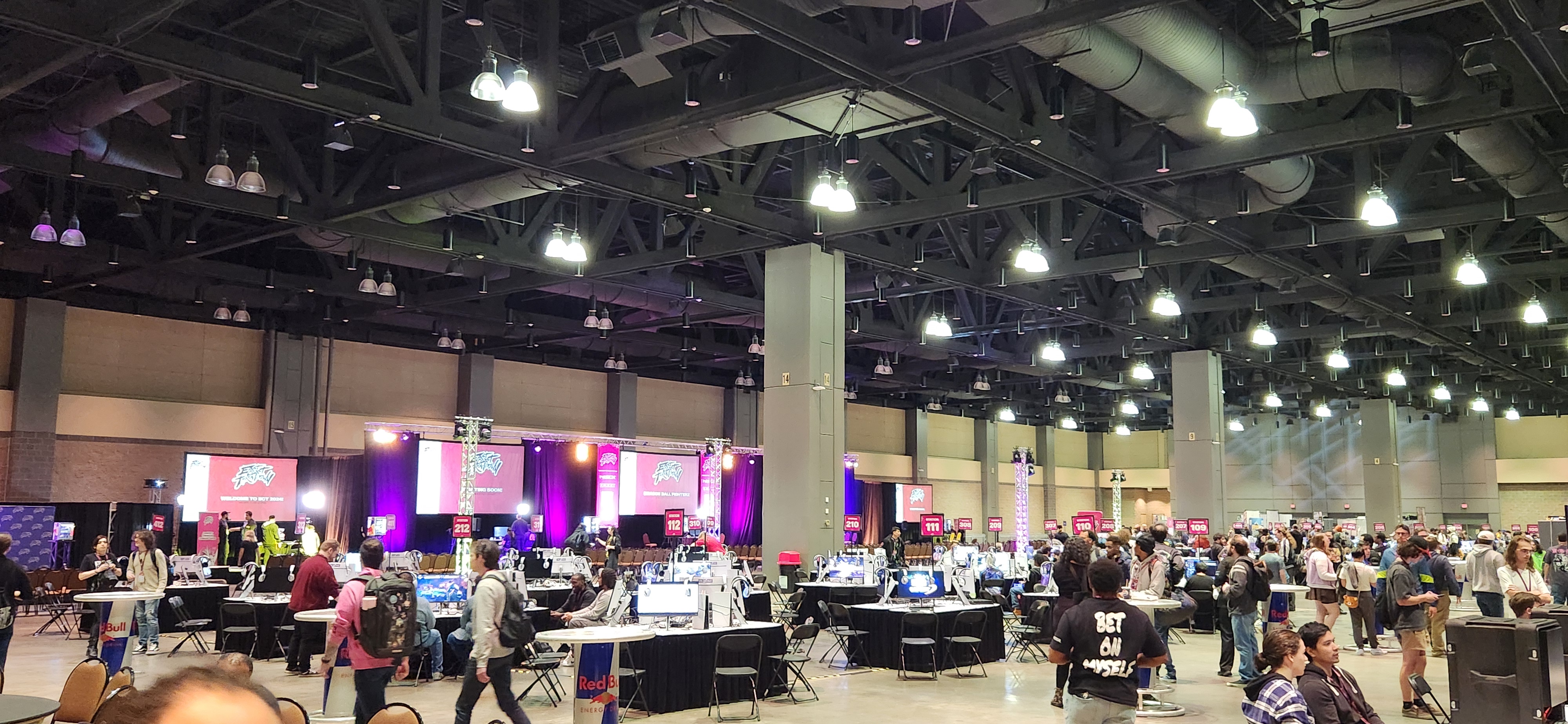
As I’ve been doing this fighting game thing more and more, I’ve found myself going to various offline events. I’ve traveled for work and sometimes leisure, but my leisure travels have never been to this kind of extent.
@geoffEXE has an incredible guide for FGC Travel in general, and I wanted to share some of my own tips and expand on some of his from my own experiences. This post assumes:
- that you’ve read Geoff’s guide prior to this one
- that you’re from the United States (though some parts and sections can be applied internationally)
- that you’re primarily flying to events
This post is also targeted more towards competitors as opposed to spectators and enthusiasts, but the concepts apply to all subgroups of tournament/event attendees.
Table of Contents
- TSA Pre-check
- How do I get it?
- Can I go through regular TSA and still get pre-check treatment?
- What’s the deal with REAL ID?
- Airlines and the flight itself
- Airlines of choice
- Bags and you
- Controllers in checked luggage
- Killing time on the flight
- Sleeping en route
- Hotels and supplies
- Choosing a hotel
- Things you might want to buy on arrival
- Things the hotel has for you and things you shouldn’t pack
- Keeping yourself going through the day
- Setup tech and you
- What to expect from the average hotel room
- Outlets for your setups
- My personal tech setup
- Setups on a budget
- Other notes on setups
- Odds and Ends
- Room population option select (traveling by car only, optional)
- Personal fitness and health for events
TSA Pre-check
TSA pre-check is easy to register for and it makes your life a lot easier when going through airport security. I travel occasionally for work and the freedom of just sending your bag through the scanner is unbelievable, wait times are incredibly short.
How do I get it?
I used IDEMIA as my provider and they have the most registration locations according to the TSA website. As of 2024, online registration costs $70, in-person costs roughly $78. If you have a Staples in your neighborhood, they’re more than likely equipped to walk you through the whole process; getting everything done at Staples, picture and fingerprints included, ran me around $90 for the whole shebang, which included my actual registration fee and any fees charged by Staples. Be warned, prices may change depending what year you’re reading this post!
What you should know about TSA pre-check and stuff like CLEAR is that you’re paying to hand Uncle Sam some Personally Identifiable Information (PII) which includes obvious things like name, address, and date of birth, but also a headshot and your fingerprints. TSA won’t fingerprint you at the airport, but they’ll be running your mug whether you like it or not when they check your driver’s license.
You have TSA pre-check status for about 5 years after registering. If you need to register and end up paying $90 for everything included like photo, prints, taxes, etc., that’s $18/year. If you don’t travel for work and you only fly to two majors for the year, you pay $9 to skip the headache of and long-ass line for regular TSA and it pays for itself.
TSA pre-check does not give you permission to bring liquids (i.e., water), large containers of lotions/creams, food, etc. through TSA checkpoints. If you get pre-check and try this, they will still make you dump the item(s) in the trash. For lotions and creams, keep them in a sealed container in your checked/carry-on luggage.
Can I go through regular TSA and still get pre-check treatment?
In my experience, sort of. I went through regular TSA with my friend for EVO 2024 because he hadn’t taken a flight for a long time and wanted some shepherding. The agent asked me why I went regular TSA and I explained, and the agent shouted ahead that I had pre-check and was coming through. This may not happen for you, but make sure that if you’re in a similar situation, TSA knows you have pre-check.
With pre-check, you can leave things like laptops, tablets, etc. inside a carry-on, duffel bag, or backpack. However, when I went through regular TSA with pre-check they let me keep my shoes on, only had me go through the regular metal detector, and gave me pre-check treatment for stuff like hand sanitizer, but I had to take all my tech out: laptop, Steam Deck, and leverless. I actually got stopped by the agent at the scanner because I forgot to take out my Razer Kitsune and they thought it was a tablet.
What’s the deal with REAL ID?
Originally, when flying domestically, your source of identification could just be a regular driver’s license or a state identification card if you didn’t have a driver’s license.
Homeland Security has a page on their website explaining what a REAL ID is and what the motivation was, but the long & short was that the US wanted standardization for identifying citizens during domestic travel without each state having their own little idiosyncrasies about what information is on a driver’s license/state ID.
REAL ID enforcement started in early May 2025. If you don’t have a REAL ID-enhanced license/state ID by then, you will have to bring your passport with you for domestic flights. I usually bring my passport with me on most domestic flights regardless since it’s an easy way to have a second piece of identification on hand.
Airlines and the flight itself
Airlines of choice
Geoff likes flying Delta, and I do too. I agree with his take on not cheaping out on a flight: if you’re going to travel, do it with airlines that your parents have most likely heard of and haven’t made the news in a negative way (United, Southwest, etc). I’ll go out of my way to fly exclusively with either Delta or American Airlines, but I flew JetBlue for EVO 2024 and it was honestly a nice experience.
Bags and you
In regards to the flight I personally recommend that you try to travel either as light or as efficiently as you can. I’ve flip-flopped between going all in on carry-on plus backpack as personal item and having a larger suitcase that I pay $70 for round trip.
Some arguments for checking a larger wheeled suitcase:
- Leg room has gotten better over the years, but you will be fighting for your life for foot space. You do not want an uncomfortably heavy underseat backpack that has a lot of fragile things in it that aren’t properly stacked/protected.
- Regardless of what airline you travel, people have really greedy attitudes when it comes to the overhead bins and they’ll often have roller carry-ons with those little extra bags on top of them. Travel with the mindset that you’re not going to get to use an overhead bin. It’s very lame, yes, but it’s a reality we have to live with.
- If you like buying swag, you will be leaving with more than you arrived with and the extra space of a larger suitcase comes in handy. It’s not easy to pack a poster without damaging it in your typical carry-on suitcase, and space concerns get worse if you bought hardware from a vendor.
Some arguments for going all in on carry-on:
- The brand-name airlines tend to have a stable market price of $35 for checking your first bag, then $50 for each additional checked bag. That $35 is only one way, so if you fly round trip with a big suitcase, that’s $70 just for one bag.
- Waiting for your suitcase at baggage claim can take a fair bit, especially if there’s inclement weather.
- If you do lose the overhead bin gamble, the brand-name airlines will check your carry-on bag for free.
- Larger suitcase means you have slower movement speed and take up more space, which can be a pain when you need to load stuff into a car or use an elevator.
Laptop backpacks from brands like Case Logic are really good personal items; they’ve got a dedicated laptop pocket, a tablet pocket you can repurpose as a portable charger pocket, large capacity per pocket, lots of smaller pockets for things like hand sanitizer, and so on. I recently picked up a tomtoc 40 Liter Travel Backpack on recommendation from a coworker; it’s a backpack that’s as close to a second carry-on as possible.
Even with the generous space of large backpacks, I recommend not packing them to capacity because you’ll also want to bring food/drink on board with you and you’ll need space for it in your backpack.
Controllers in checked luggage
The rule for whether or not you can put something electronic in your luggage usually boils down to “does it have a large enough lithium ion (li-ion) battery inside?” I have an electric toothbrush with a li-ion battery and that’s considered within regulations according to TSA. When in doubt, TSA publishes a “What can I bring?” list. You would be surprised what you can and can’t bring.
My Hitbox has also flown in checked luggage without issue, and I’ve seen others do this with bigger arcade stick controllers like the Qanba Obsidian. You probably have some kind of instinct to wrap it in a bath towel, but if you’re packing enough clothing, whatever clothes you pack should be sufficient. You can still wrap it in a bath towel if you want.
Now that leverless controllers with lower profiles and smaller dimensions are starting to dominate the market, it’s a lot easier to keep things centralized in your backpack (aka your personal item).
Killing time on the flight
If you’re flying alone, bring something to do that’s not disruptive. I bring my Steam Deck or my Miyoo Mini Plus, sometimes a physical book, sometimes my Kobo Clara. I’ve found that books & handhelds are usually the best options for killing time on flights: if it doesn’t need an internet connection, it’s golden.
Music is a tricky one: I’m a weird nerd so I have a Plex server where I host my music and don’t use streaming services like Spotify. Delta and American Airlines make you pay for wi-fi access but JetBlue provides wi-fi access for free. Delta provides their own music playlists available for streaming and American Airlines has a setup with Apple Music. You can use the JetBlue wi-fi to stream but just know everyone else on board has the same idea. I just use Plexamp, download some albums locally, and I’m good to go.
Video streaming is also another tricky time-waster with the same problems as music if you’re not buying the in-flight wi-fi. Again, I’m built different (weird nerd) so with that same Plex server I can download stuff to my device and watch on the flight or choose to stream if I have the option.
Sleeping en route
Sometimes you’ll be unlucky with your fellow passengers and get someone disruptive, but it’s possible to catch a few extra winks on an airplane as an alternate way to kill time, recover from early morning travel, etc. If you’re already stressed by the notion of flying, this section might not be of any use to you.
I made the mistake of cheaping out on a neck pillow, I grabbed one from Staples when I signed up for TSA pre-check and it was ok but didn’t feel great. However, I saw one of the memory foam ones at the airport store that costs $50 and finally relented; if you can afford it, get it. There are too many weird knockoff variations on Amazon and I personally was willing to pay the airport tax.
I have noise-cancelling earbuds, which are really nice if you can afford them (from a brand like Sony or Bose). If you have regular earbuds, you can try using them in conjunction to drown out any noise, but you may want to invest in actual earplugs. When I used to swim a lot, I got Mack’s Silicone Putty Earplugs and they actually do what they say on the tin really well.
Someone’s gonna say it to you eventually so I might as well get it out of the way: yeah, you can talk to your doctor and get a benzo prescription, but save getting xan’d out for the 13~16 hour flight to Japan if you ever go to EVO Japan. A few hours going around the US shouldn’t require drugs; JFK to O’Hare is roughly 2 hours and change. This Reddit thread should kinda cover everything in this subject but if you can lock in for a fighting game, you can lock in for a flight without a benzo.
Hotels and supplies
Choosing a hotel
Geoff recommends the Marriott and I do too. I’ve had nothing but good experiences with Marriott hotels, even when things go wrong. I rented a room at the local Marriott for East Coast Throwdown 2022. While my friends and I were at the venue for the second to last night, the ceiling in the shower caved in:
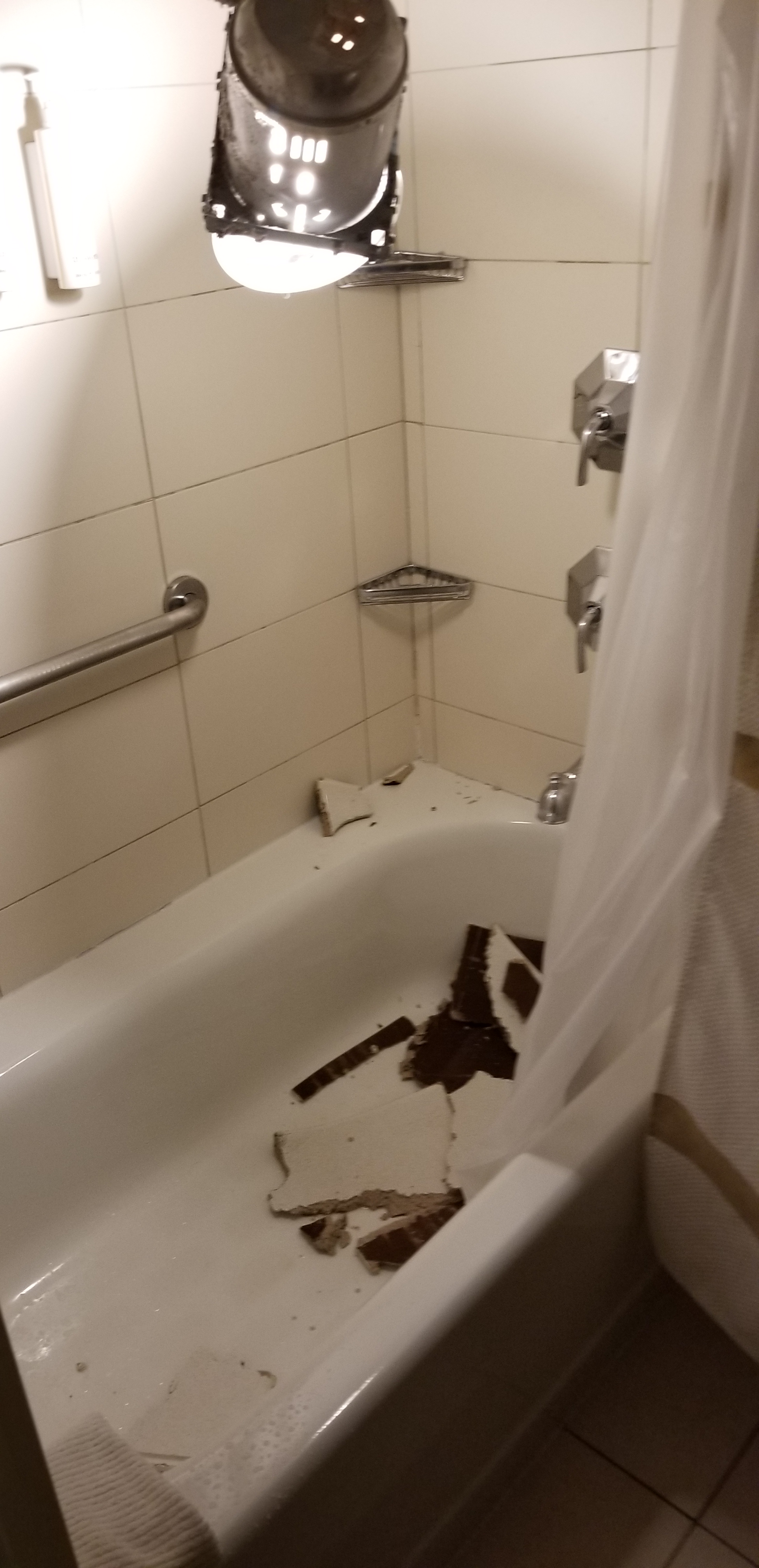
We contacted the front desk, they sent the maintenance guys on duty who verified the situation, and they moved us into a larger room instantly and at no charge.
I also recommend Hilton hotels as I’ve used them for attending conventions outside of fighting games. Most hotel chains have similar layouts and like Geoff said, you get access to loyalty rewards programs for free if you sign up.
If you mention that you’d like to pay for wi-fi for the duration of your stay at the desk when checking in, Mariott & Hilton will tend to use this as an excuse to shill their loyalty program and if you sign up, they’ll include wi-fi “for free”. I have a Marriott loyalty program membership but I keep forgetting about it, so the front desk looks me up and I get wi-fi for free.
Additionally, known-brand hotels like Marriott and Hilton tend to have fitness centers that sometimes go unused. At EVO 2024, the Marriott hotel I was at had a first-class and pristine fitness center: dumbbells, kettle bells, benches, treadmills, medicine balls, TRX station, the works.
However, sometimes you don’t have that kind of availability. I recommend using Hotels.com (child company of Expedia) to vet any hotels in the area, see previews of the rooms and their layout, and save a few bucks when booking rooms.
Personal example: there’s a Sonesta ES Suites that’s a short drive away from the Combo Breaker venue, and their rooms are more akin to 1 bedroom apartments rather than hotel rooms. I only discovered this because I had to use Hotels.com to find a place to stay since the Combo Breaker 2023 hotel block was all booked. Moral of the story? You never know until you research and experiment.
Things you might want to buy on arrival
Geoff goes over how clutch the Walmart+ subscription is for scooping room necessities; I’ve had to Uber for room necessities before and it sucks from a financial perspective. I’ve used Walmart+ and it’s extremely convenient and easy to use. If you input the hotel address, you’ll get a text when the delivery driver is close and you can meet them in the hotel lobby and lug your goods to the room.
If you don’t have or want a subscription, I recommend locating the closest convenience store (i.e., 7/11) and the closest drug store (i.e., Walgreens, CVS, Rite Aid) and seeing what you can accomplish in one trip because the hotel’s “store” will always overcharge you by several dollars. Wanna see a $6 water bottle outside of an airport? Pay your hotel’s “store” a visit.
The following items in this section are suggestions based on what’s come in handy for me and my suitemates:
A case of water bottles for the room is always welcomed and useful. Of course bring a reusable bottle of water if you want, but disposable bottles of water are really flexible:
- You can bring a few with you to the venue and keep the homies hydrated just in case
- Sometimes your body doesn’t agree with the local tap water
- If you forget it at a setup, you don’t have to go “fuck I just left my $12 Camelbak eddy somewhere guess that shit is gone forever” (totally not a personal experience at Combo Breaker 2023)
- Great to have on hand in the room because we all know your ass is not using the tap in the room c’mon bro
If you have 3 people in your group you might not even finish a 24-bottle case over the course of the event, but it’s a cointoss whether or not you can get a smaller case size that’s cost efficient. Use your judgment for the amount of people you’re traveling with.
A roll of paper towels was something I didn’t think I needed until I actually got a roll complimentary when I stayed at Sonesta for Combo Breaker 2023. Great for substitute/additional napkins if you bring food to the room, same for cleaning a room’s table after food as well.
A small box of garbage bags depending on your room’s configuration. Housekeeping comes around but with multiple people in a room the small wastebaskets will fill up pretty quick. Do housekeeping a solid, keep your trash centralized and easy for them to just take away; they’re putting up with a lot of us during events, don’t make their lives harder.
Things the hotel has for you and things you shouldn’t pack
Just to get this out of the way since this is an epidemic: you should always bring deodorant. I would even recommend an “anti-gamer” hygiene kit that my friend Dr.00 came up with that consists of a regular deodorant stick or 2 travel sized ones, hygiene wipes (something similar to this), and I would probably toss in some travel tissues to clean the deodorant stick(s). Keep yourself and the team fresh.
One time at work, my team was talking about flying to our offsite meetup (company get together), and my team lead said that he packs pretty minimal in terms of toiletries these days since it’s easy to find a drug or convenience store and pick up some toiletries there.
If you have specific living requirements (i.e., medication), obviously don’t skip out on packing them. If you have an aromatic (cologne, perfume) you want to wear on top of deodorant, by all means. However, what’s nice about modern hotel amenities is that they’ve got shampoo, conditioner, and body wash on tap in pumps in the shower.
If your hotel is on the cheaper side, do not rely on the hotel for bathing/cleaning amenities because they will not have the money to provide them. Either come prepared with travel sizes of soap and shampoo or have that Walmart+ subscription ready.
Since I’ve had to answer this question before: for first time travelers, do not pack bath towels, washcloths, etc. unless you’re using a bath towel to protect a device like an arcade stick. The hotel provides several types of towels for the room by default, the front desk will have housekeeping stock the room with extra towels if you ask, and the hotel will typically not let you use their washer/drier for your personal towels.
You can bring a loofah if you want, though.
Keeping yourself going through the day
Some people have that dawg in ’em where they’ll just power through the day and then eat a big meal at like midnight or something. I think it’s pretty important to pace yourself and make sure you’re still eating and hydrating decently. Consider that you’re likely going to be waking up early for the venue even if your pools are really late.
Outside of water, I pack “rations” for each day of the event if I can. I tend to pick from the following:
- “Protein” bars that lean more towards the food side, like CLIF and Nature Valley
- Either nuts (biasing more towards almonds, cashews, Brazil nuts) or trail mix (this Costco/Kirkland brand is my favorite for taste/price/nutritional value)
- Beef/Turkey jerky
- Monster Zero Ultra as my end-of-day stimulant (my favorite is “White Sip” for those in the know)
You can substitute the “protein” bars with real protein bars like Quest if that’s better for you. I’ve found that if I’m not working out, I really dislike how a Quest bar both tastes and feels sitting in my stomach.
These things are harder to pack if you’re flying somewhere for an event, but if you leverage either something like Walmart+ or a rideshare to a retail chain, you can still buy them. Events that are within driving distance make this part easy because you can prepare ahead of time and just toss the stuff in the car.
Something to be aware of because the big tournaments are morphing from competitor-first tournaments to “everyone is welcome” conventions; the big tournaments are putting strict bans on outside food and drink that isn’t water, and at least at Combo Breaker they’ve had security adopt a TSA-like stance where you must keep your reusable bottles empty until you’re inside the venue.
I’ve accidentally and “accidentally” managed to sneak in the aforementioned Nature Valley bars to the venue, and I even was able to bring in a can of Monster at EVO because I forgot to drink it before going through bag check and the security person didn’t check the absolute bottom of the bag for it, but this isn’t really sustainable.
I still recommend bringing/buying items like those I mentioned prior because you can always go back to your room during down time, and you can always eat on the go or wait just outside of bag check to fuel up. On the topic of going back to your room: if it’s your first time at a tournament, I recommend taking a break at your room every few hours if your pools are late in the day/at night.
Get yourself some distance from the crowd and either head back to the room at best, find a chair at worst, and rest for 20~30 minutes or so. This is the most important thing you can do for yourself if your pool is towards the end of the day/at night, you don’t have enough experience doing this sort of thing, and you want to play well.
Setup tech and you
As I’ve spoken to more and more people in the scene, I’ve learned that the old days of having a setup in the hotel room has kind of faded away in favor of just hanging out in the venue for hours on end. One reason I’ve been told is that since everyone isn’t in the same hotel block anymore, there’s no “traveling” within the hotel to find rooms where people are running training sessions and money matches.
I’ve found this move to the venue a little strange because there’s usually a monopoly on setups for active brackets and there’s usually not enough space (if any) for sufficient BYOC areas, and most socially well-adjusted people are likely going to head out to dinner with their friends once the setups really start freeing up. Regardless, it’s reasonable to have some kind of setup to mess around with in the room for the day/night before the event. I’ve done a lot of hands-on experiments and general research and these are my findings on setup tech for hotel rooms.
What to expect from the average hotel room
Hotel rooms are designed for normal people and families doing normal things. When I fly for work, I have a very straightforward setup (a laptop + ergonomic mouse + charger) so I just drop my laptop off on the desk, set up the charger and I’m done.
Hotel rooms are not designed for little gaming nerds with triple-digit refresh rate monitors and laptops used as gaming stations. There’s usually a couch and a minimal amount of chairs in a bigger room, sometimes there are no extra chairs at all outside of the one at the desk.
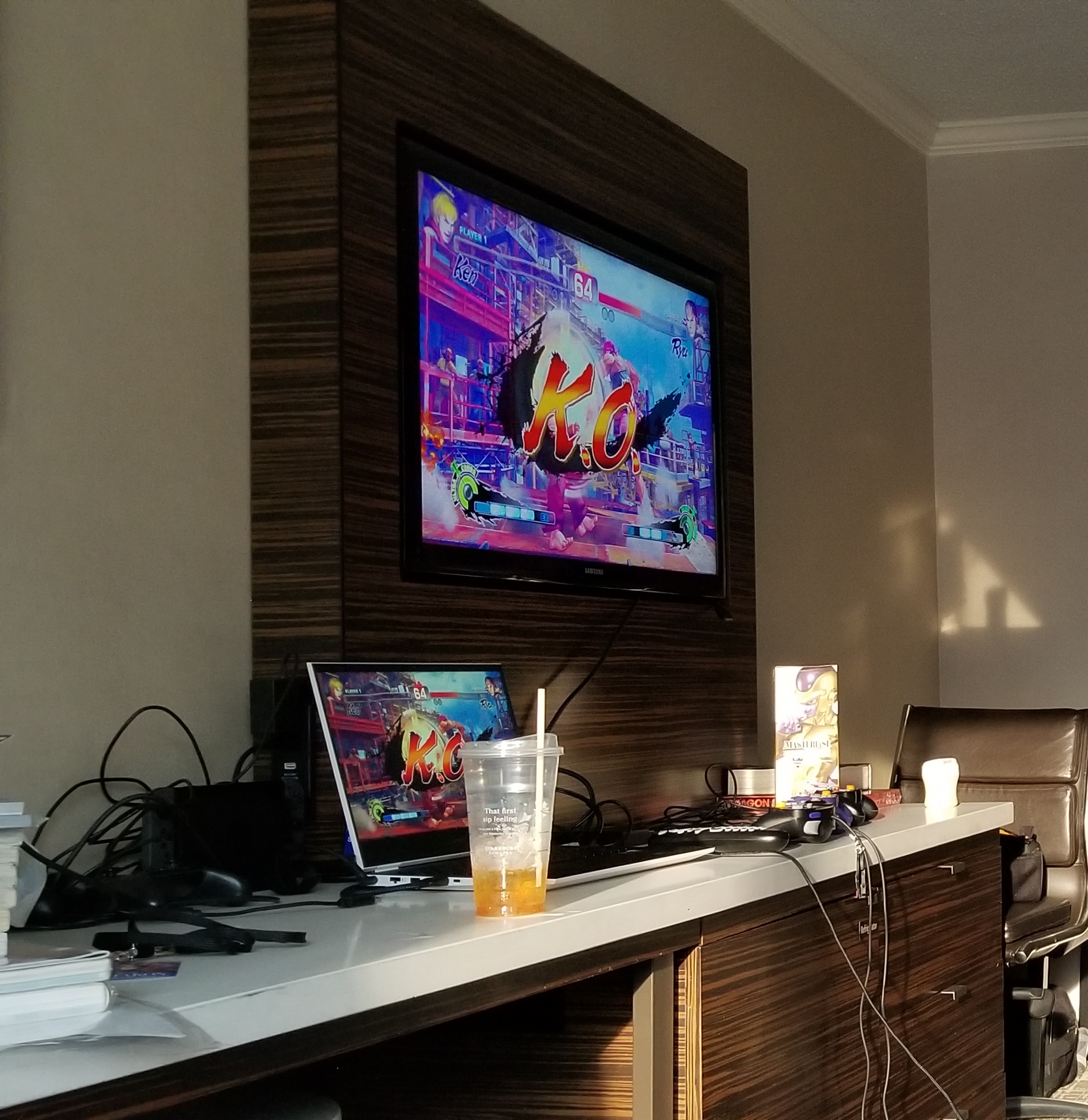
Every hotel, even in a chain, seems to have a different physical setup for the television (no, you’re not actually using the 12hz television unless you want to). Sometimes the television is mounted on the wall, in which case you’ll angle the television up or down to access the HDMI port. This is one of the better configurations since you don’t have to deal with having to move the television itself and the hotel tends to have an extra surface in its place that you can use for setups. The following image was the setup at the Westin D.C., previously the Renaissance D.C.:
Other times the television sits on a media table/dresser of some kind. The setup with the most freedom is one where you can unplug the television and move it somewhere else, like the room’s closet or in a corner of the room, but be careful doing this since if that thing is damaged the hotel’s gonna be looking at you for ca$h and your behavior may impact how they have the television set up in the future, rules they may put in place, etc.
The setup with the least freedom is where the television is bolted to the furniture surface in some manner (probably because some other guest fucked up prior and broke the hotel’s TV trying to move it). In cases like these, you’re usually limited to the desk for your setups and you’ll have to get creative if there aren’t enough movable seats to use the desk. For context, I’ve set up my laptop on stuff like ottomans in the past and had to run the power cable awkwardly around it.
Outlets for your setups
Hotel rooms tend to have a lot of outlets strewn about the room layout, so you won’t really run into an issue where you’re struggling to get everything plugged in, but sometimes the outlets aren’t conveniently placed for your setups.
There are three items you may want to bring (ordered in descending priority):
- Power strip (the Amazon Basics brand works well, I have the Anker Power Cube and use this)
- Extension cord (something like this, this, or this)
- Grounded outlet adapter
I’ve brought the power strip in the past but with how hotel rooms tend to have a lot of outlets in the living areas, I’ve found that an extension cord with 2, maybe 3 outlets is typically sufficient for setups.
Again, this is unnecessary if you’re not bringing some kind of setup with you like a console or Steam Deck because the hotel has a plethora of outlets for chargers and such.
My personal tech setup
As of August 2024, I’m running a HP Omen from around 2022 (specs here). It runs everything fighting game and emulation related I throw at it and is perfect as both a fighting game setup since it’s got a 165hz 16″ screen and a general purpose gaming laptop. My only major issue with it is that the trackpad has become kind of questionable as it’s gotten older.
Based on the changing landscape and what my friends and I actually play when we’re bumming around in the hotel room, I’m weighing two options: going all-in on my Steam Deck or a more powerful laptop with a smaller screen.
As of May 2025, I’m running the Steam Deck setup I outline below in Setups on a budget. I’ve found that it’s good for Street Fighter 6, Fatal Fury City of the Wolves, any party game I throw at it, and streaming from my Plex server.
If I do decide to go with another laptop, I’m likely eyeing the Razer Blade 14. I’m not a huge fan of Razer products because I remember what Razer used to be like back in my FPS days where they made a lot of inferior or useless schlock outside of the Deathadder. However, their quality of products has slowly gone up over the years and after talking with a coworker who uses one for work and play, I’ve found it fits this use case perfectly.
Additionally, at Combo Breaker 2025, I saw someone with the Asus Zephyrus G14 and it’s just as small as the Razer Blade. It worked perfectly for sitting between stations on a Saturday night/Sunday when the setups were being packed up but there were still some tables around. The G14 has some pretty beefy specs but the RAM is soldered onto the device; if the RAM goes, you will be on a support call with Asus.
You’ll have to do some searching on your own to find something you really like. My only true recommendation is that you should plan your backpack/carry-on contents around the size and weight of your laptop: if you’ve got a laptop with a 15” or 16” screen, try to keep your backpack/carry-on weight footprint lower.
Valve announced the Steam Machine on November 11th, 2025. It’s a 6” cube with midrange desktop power and it’ll likely change the gaming hardware game on multiple fronts, possibly even fighting games. It’s still a ways off, slated for release in Early 2026, but keep it in mind.
Setups on a budget
As an alternative to a laptop, I’ve spent some time trying to develop a budget-conscious, performant, and portable setup as an alternative to laptops and lugging around consoles. With the Steam Deck, I believe that I’ve found a good machine that won’t break the bank.
Depending on the Steam Deck you choose, the pre-tax, pre-shipping pricetag of this setup is approximately $675 versus the $1000 minimum (pre-tax, pre-shipping) for most laptops. It’s very light even with the case and works excellently as a BYOC for FGC events that support BYOC.
Currently, the setup is comprised of:
If you’re an Amazon Prime member, the prices of the aftermarket dock and external monitor drop which brings the pricetag down to about $600. All of these prices as well as the devices themselves may change as this post ages!
The Steam Deck has run pretty much everything I’ve thrown at it: Street Fighter 6, Street Fighter 5, Guilty Gear Strive, King of Fighters 15, Granblue Versus Vanilla and Rising, the list goes on. My only missing datapoint is Tekken 8.
From repeated trials, Street Fighter 6 works great but there are rare instances on certain stages where landing a punish counter will result in a framerate drop for a millisecond. This appears to only happen on “sunny” stages with a lot of bright and complex lighting like Marisa’s stage and Lily’s stage.
This setup is actually insanely effective if you end up in a situation like my friend KINGMAN and I were where we showed up for Combo Breaker 2025 in the morning and hotel check-in wasn’t until 2pm, then got pushed to 4pm because they were still cleaning up rooms for all the Combo Breaker attendees. We commandeered a couch + table, set up the Steam Deck and monitor with the portable charger, and played City of the Wolves to kill most of the time.
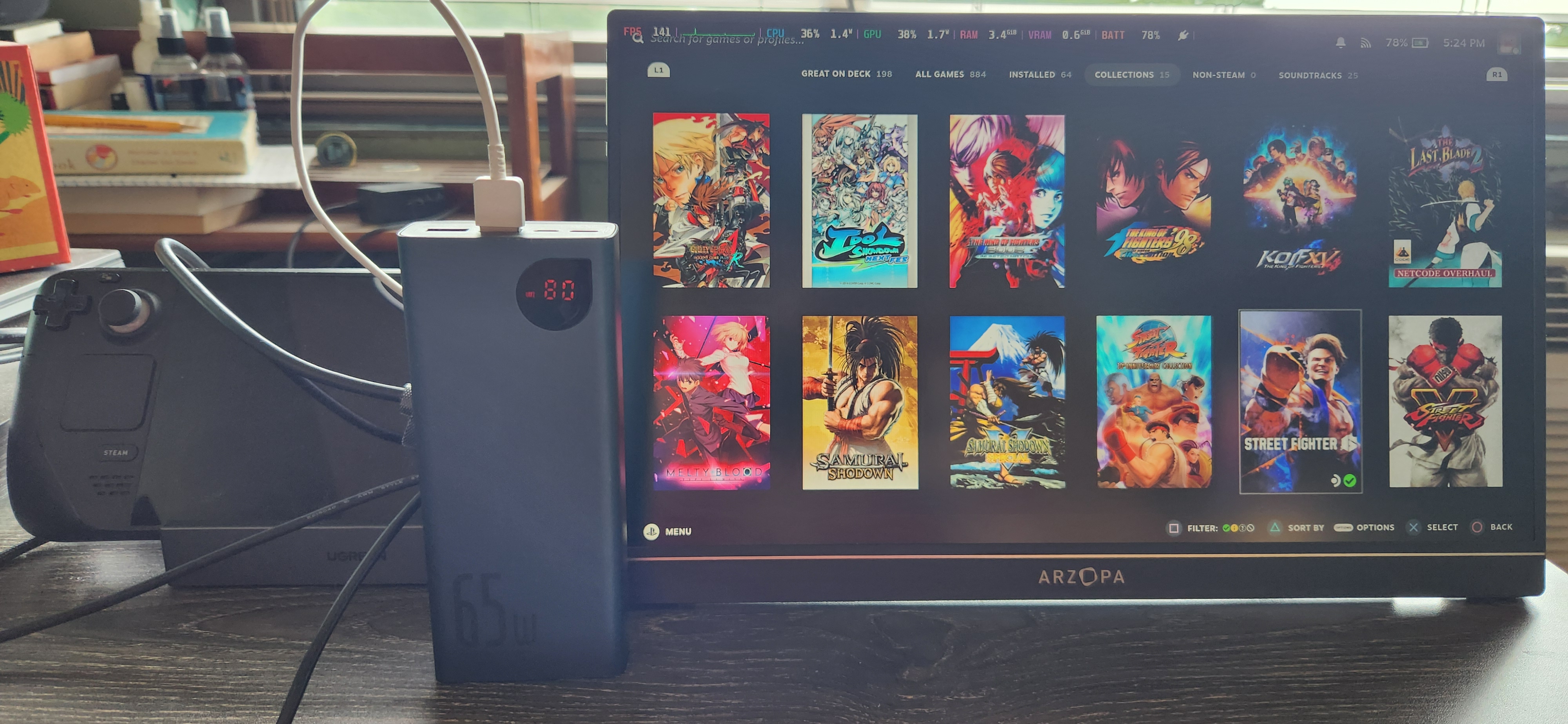
Additionally, I recommend:
The charger provides enough power delivery for charging any small device like a phone or portable battery, as well as the Steam Deck itself, once you get set up in the room/near an outlet. The mini keyboard is great for any setup but is how you can easily use the desktop mode on the Steam Deck without taking up a lot of space in your backpack.
It’s likely that as time passes, this combination of items will become dated, but as of August 2024 this has proven to be very effective. I’ll try to come back and update this section and the prior one as the tech scene changes.
What’s very nice about the Steam Deck is that if you’re feeling bold and/or your fighting game “kit” is really lightweight, it’s really trivial to toss the Steam Deck in its case and into your backpack if it’s large enough for any BYOC setups an event might have.
Other notes on setups
Something I’ve seen and even tried myself is using the Intel-designed NUC (Next Unit of Computing). If you buy a powerful-enough/gaming focused NUC, you can run most fighting games with ease and use it as a BYOC setup, but the issue will always come down to the pricetag; ASUS took over production of NUCs once Intel stopped producing the computers themselves, and as part of their gaming lineup, ASUS has made two NUCs with Nvidia 4xxx series chips in them. The middle-end NUCs that people use as desktop substitutes for office work and streaming aren’t great for anything beyond Guilty Gear +R and Fightcade.
If you’d like to stream and you have a console with you, rather than forking over $175 + shipping & handling for an Elgato capture card, I’d recommend scooping EVGA’s XR1 Lite. You won’t be doing 4k streaming or anything crazy with the XR1 Lite, but it does what it needs to do perfectly and works with OBS out of the box without any fuss. Whether or not you’ll actually be able to stream on a hotel connection may vary but it’s also nice for doing plain old video capture from a console so you can save the offline sessions.
Hotels are phasing out ethernet jacks existing in hotel rooms, but another item you may want to consider is a cheap ethernet switch, I have this one from TP-Link. If you have multiple setups and access to an ethernet jack, it’s a good way to give multiple devices a stable albeit slow connection to the internet. Whether or not an ethernet switch is effective even if an ethernet jack exists in the room is also dependent on the room’s layout.
If you really want to, you can find a local Walmart, Best Buy, Target, etc., and “buy” yourself a gaming monitor/TV with high refresh rate (120hz+) to use in the hotel, then return it on the last day of the event. I personally think this is ethically sketchy and the one time my group tried this, we somehow got the only physically damaged monitor they had in the store and the actual usage goal was a bust.
Odds and Ends
Room population option select (traveling by car only, optional)
This is handy for cons but it works for fighting game tournaments as well, but it hinges entirely on whether or not you’re driving to the event in question.
If you’re driving to the event, depending on the brand, it’s not a huge detriment to shove an air mattress in the trunk of your car. If you don’t have any extra guests stopping by, you either leave it in the trunk or the hotel room’s closet. Otherwise, you have it on tap if someone wants to crash, unexpectedly or not.
I have two twin-size Intex Electric Air Mattresses in the 18″ configuration, which is just a few inches shorter than your typical hotel room bed. The 13″ configuration is pretty low to the ground like if you tossed a regular old mattress on the floor. There’s a price difference between the two.
To go with them, I also have:
What’s nice about the Intex mattress is that the mattress won’t take up all the space in its bag. You can toss in the sheets, throw, and pillow in the bag as well, and it’s all easy to wash.
Personal fitness and health for events
I had gone my whole gaming life without going to one of these large-scale offline events until I started playing fighting games. 2019 was the first time I went (Otakon), and I ended up going to that event again. My biggest mistake and inspiration for the content in this guide was that I bought a Qanba Obsidian as my first “real” fighting game peripheral and its accompanying backpack.
The Obsidian is about 7 lbs (3kg) and its corresponding backpack is huge. In addition to stuff like water and various fangoods, this thing was incredibly annoying and as a white-collar worker, I did not have a good back. I wasn’t helpless but lugging all that around for hours and miles at a massive con was causing a lot of pain in my lower back. When I got back home, I signed up with a gym with one goal in mind: get strong enough to lug shit around all con/event long.
A lot of these fighting game tournaments and cons involve a lot of walking and standing, and you will likely not get a lot of chances to properly sit down. If you can do so, hit the gym to build muscle + stamina because depending on your peripheral you can easily find yourself feeling strained by all the hustle and bustle of the event you’re at.
I would also recommend investing in a good pair of shoes because you will be standing a lot. If your budget allows for it, get yourself a pair of Birkenstock shoes for style and arch support or Birkenstock clogs for comfort and support, and Birkenstock has stock for both men and women. Gym shoes work well as a cheaper alternative to accomplish the same end, but remember to look specifically for gym shoes versus runner’s shoes.